

In short: a freelancer or consultant can take deposits by Mobile Money on their own WordPress site with Fosia Collect, a free plugin that adds a Pay form to any page, without WooCommerce. Set the form to Pay, choose a fixed deposit or an amount within limits, and add a required “Invoice number” field: each payment then arrives in your own payment account with the client’s name and the invoice it belongs to, and the client gets a receipt once it is confirmed.
Every freelancer in Accra, Nairobi or Dakar knows the moment: the client loves the quote, promises to “send something tomorrow”, and the shoot, the logo or the training is booked without a single franc paid. A deposit fixes that, but only if paying it is easy. Most clients carry a Mobile Money wallet, not a card. This guide shows how to turn your website into the place where deposits are paid, recorded and receipted.
Why a form beats “send to my number”
Sharing your personal number works until you have several clients at once. Then the questions start: which payment was for which job, did the client send the full deposit, where is the proof for your accountant? A Pay form on your site answers all three. Every payment carries the client’s name, the amount, the operator, a reference and the invoice number they typed. It also looks more professional than a bare phone number.
Fosia Collect is made for this. It is free, with no licence key, no limit on forms or payments and no commission from FOSIA: only PawaPay’s own processing fees apply. It is aimed at organisations and people who do not sell products: NGOs, schools, associations, and freelancers and small services.
Design the deposit form
Add the Fosia Collect block to a page called “Pay a deposit” and set it up in the sidebar.
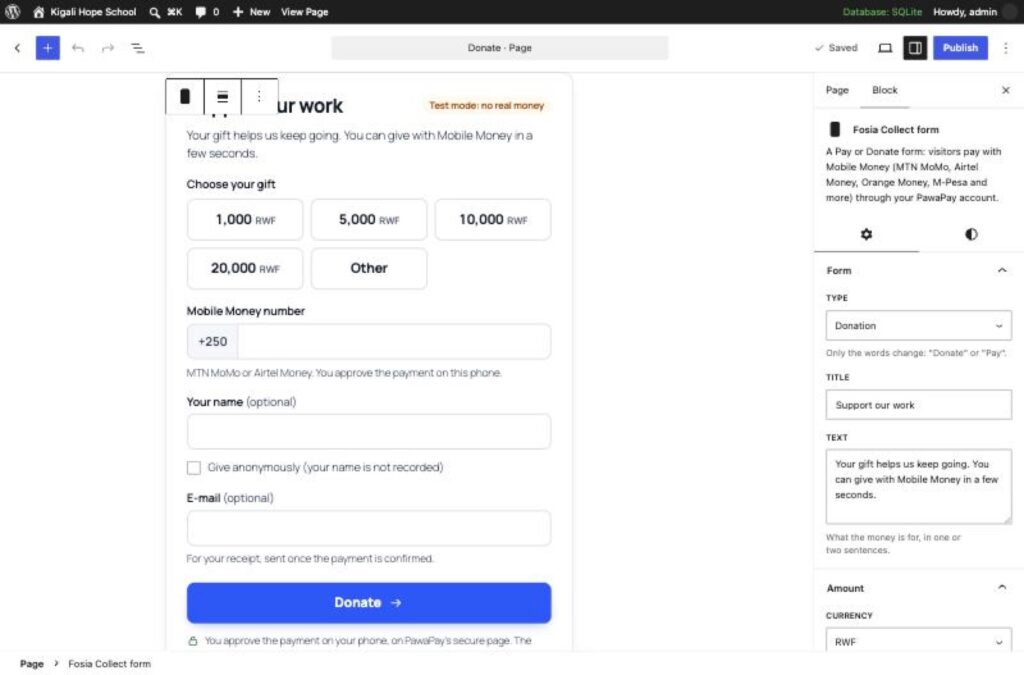
- Type: choose Pay. Only the words change, so the button reads Pay instead of Donate.
- Amount: one fixed amount if your deposit is always the same, or “Other” with a minimum and a maximum if it depends on the quote. You can also offer up to six quick amounts, one per package.
- Extra field: label it “Invoice number” and make it required. It appears in your payments list, the CSV export, the e-mail you receive and the client’s receipt.
- Name and e-mail: make both required, so every client gets a receipt.
- Message: keep it on for short notes such as the event date.
- Give anonymously: turn it off. A deposit must be traceable to a client.
Here is how three different freelancers might set it up:
| Freelancer | Amount setting | Extra field |
|---|---|---|
| Wedding photographer in Kigali | Quick amounts, one per package, in RWF | Invoice number |
| Web designer in Accra | “Other” between a minimum and a maximum, in GHS | Invoice number |
| Trainer in Dakar | One fixed amount per seat, in XOF | Participant name |
Working with clients abroad who still hold a wallet at home? A form can be priced in USD or EUR: the payer sees an estimate in their own currency before paying and approves that amount on the phone.
Set it up in a few minutes
You need WordPress 6.3 or later, PHP 7.4 or later, HTTPS and your own PawaPay merchant account. A sandbox account to test is free; the live account is opened after your documents are checked, so look at PawaPay’s requirements for your business first.
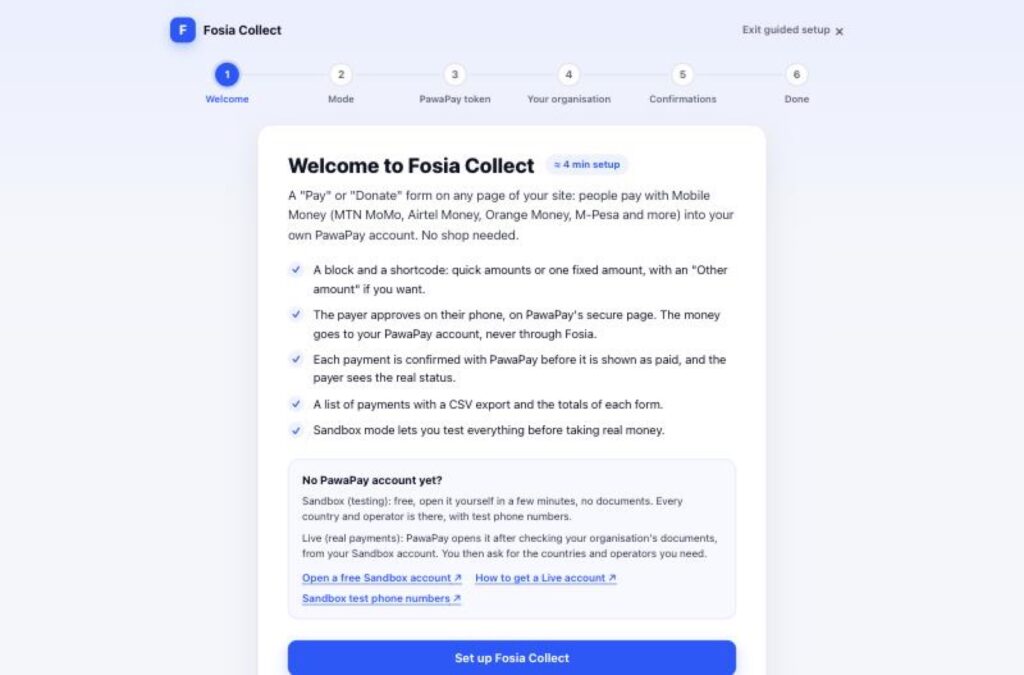
Install the plugin from its page on pay.fosiarw.com (it is not on WordPress.org), paste your sandbox token in the guided setup, add the form, and pay once with a PawaPay sandbox test number. When the payment shows as paid, switch to your live token.
Your routine with each client
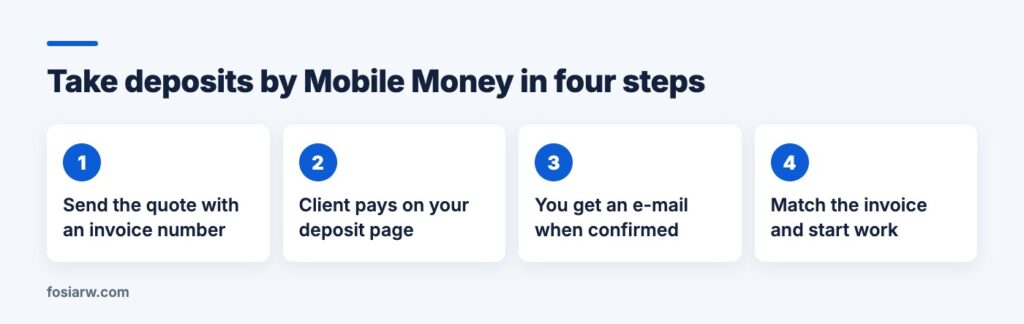
- Send the quote with an invoice number and the link to your deposit page.
- The client types the amount and the invoice number, enters a Mobile Money number and approves with their PIN on a secure payment page.
- Back on your site, the client sees the real status: paid, not received yet, or failed with the reason and “Try again”.
- You receive an e-mail for each confirmed payment, and the client receives a receipt.
- Find the line in Fosia Collect, Transactions, check the invoice number, and confirm the booking.
A payment shows as paid only when your payment account confirms it with exactly the amount and currency asked; anything else is marked “To check”. If the client closes the page before coming back, the plugin keeps checking in the background.
When a project is cancelled
Refunds are done from the payment’s details in WordPress, in full or in part, back to the Mobile Money number that paid. You can never refund more than was paid, and each refund is followed until it is final, with a note of who refunded, when and how much. Put your cancellation terms in the quote, so a partial refund is never a surprise.
No WordPress, or selling products?
If you only have a social profile, Fosia Connect gives you payment links, QR codes and a payment page at connect.fosiarw.com/@yourname, with no website needed. If you sell products in a WooCommerce shop, Fosia Pay is the right tool. Our guide to getting paid by Mobile Money without a website compares the options, and our article on professional services and AI recommendations helps clients find you in the first place. Selling your services on Fiverr or Upwork too? Read how freelancers get found by AI assistants.
Frequently asked questions
Can I ask for the balance with the same form?
Yes. Use “Other” with limits, and ask the client to type “balance” next to the invoice number. Or create a second form called “Pay the balance”, so each total stays separate on your dashboard.
Can a client pay a deposit every month automatically?
No. Mobile Money asks the payer to approve every payment on the phone, so there is no automatic debit.
Does it clash with my WooCommerce shop?
No. Fosia Collect keeps its payments in its own list, and it can share the same payment account as your shop.
Who keeps my clients’ details?
Your site. They are stored in your own database and erased after the period you choose.
Which countries does it cover?
The countries and operators enabled on your payment account, among 21 African countries.
Stop chasing deposits: download Fosia Collect free and put a Pay form on your site today, or book a free call with the FOSIA team.