

In short: in a matching donations campaign, a sponsor promises to add the same amount as the public gives, up to a cap and until a date. Fosia Crowdfunding Pro shows that promise on your campaign page as “every gift is doubled up to a cap until a date”, keeps the sponsor’s share apart from the amount raised, and adjusts it when a gift is refunded. Donors give by MTN MoMo, Airtel Money, M-Pesa or Orange Money, straight into your own payment account.
Many organisations already have a potential sponsor without knowing it: a hardware shop owner who supports the parish, an alumni association abroad, a company that wants its name next to a school library. A cheque from them is welcome. A match is often better, because it gives every small donor a reason to give now: their 5,000 RWF becomes 10,000 RWF for the cause. This guide covers the agreement, the page, the weeks of the campaign and the mistakes to avoid.
How a match works, in numbers
Take a youth association in Kigali raising 4,000,000 RWF for a library. A sponsor agrees to match every gift one for one, up to 1,500,000 RWF, until 15 December.
- Donors give 1,500,000 RWF by Mobile Money before the deadline.
- The sponsor adds 1,500,000 RWF, as promised.
- The cause has 3,000,000 RWF, and donors know their gifts counted twice.
If donors give only 900,000 RWF before the date, the sponsor adds 900,000 RWF, unless your written agreement says otherwise. That is why the agreement comes first.
Agree the match in writing
A WhatsApp voice note is not an agreement. Write one page, signed by the sponsor and your organisation, that answers six questions:
- The ratio: one for one is the easiest to explain.
- The cap: the most the sponsor will add.
- The deadline: the date and time after which gifts are no longer matched.
- If the cap is not reached: does the sponsor give only the matched amount, or the full cap anyway?
- How and when the sponsor pays: by bank transfer or Mobile Money, to the organisation’s account, within a set number of days after the deadline.
- Visibility: may you show the sponsor’s name or logo, and where?
Keep the sponsor’s payment in your normal accounts with its own reference, so your treasurer can trace it. Our guide to records NGOs need for donations explains what auditors ask for.
Show it honestly on the page
Fosia Crowdfunding Pro includes a matching sponsor. The page states the promise, and the matched amount is shown apart from the amount raised, so donors can see what came from them and what came from the sponsor. When a gift is refunded, the match is adjusted automatically.

Three Pro features work well with a match:
- Impact tiers such as “5,000 RWF = 10 books”: with the match, a donor sees that their gift buys twice as much.
- Milestones at 25, 50, 75 and 100% of the goal, which give you natural moments to post updates.
- Live donations, a list of gifts as they arrive, anonymous by default.
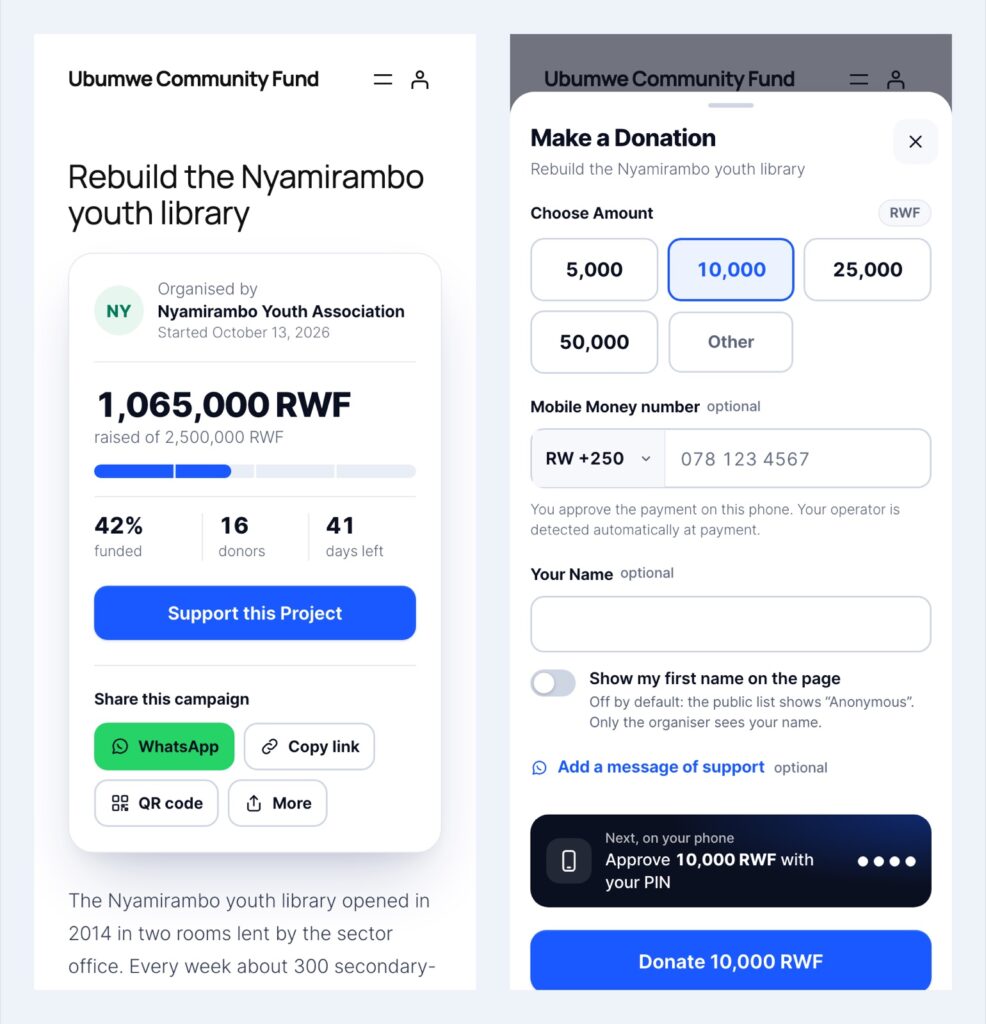
Donors give on a page made for phones: they pick an amount, approve the payment with their PIN, and once the payment is confirmed, the total, the progress bar and the donor list update.
Run the weeks of the match
Before launch
Set the campaign goal, the end date and budget lines that say what the money pays for. Thank the sponsor privately and agree the launch message with them.
Launch day
Lead with the match: “Until 15 December, every gift is doubled, up to 1,500,000 RWF.” Share the link on WhatsApp, and print the QR code for your notice board or event. The Pro version also offers QR posters and table stickers.
Halfway
Post an update with how much of the match is left. “Only 600,000 RWF of matching left” gives people a concrete reason to act.
Last 48 hours
Remind supporters of the deadline once, clearly. Ask the sponsor to share the campaign with their own network.
After the deadline
Collect the sponsor’s payment as agreed, post an update thanking them and the donors, and keep reporting on what the money buys. Our French guide on proof of spending for donors shows how Pro displays receipts.
Mistakes that cost trust
- Announcing a match before the sponsor has signed.
- Extending the deadline without the sponsor’s written agreement.
- Adding the sponsor’s money to the public total as if it came from donors.
- Pressuring people in WhatsApp groups where the appeal is not welcome. See our WhatsApp fundraising guide.
What you need and what it costs
Fosia Crowdfunding runs on WordPress with WooCommerce: each donation is a WooCommerce order. For Mobile Money it works with Fosia Pay, and Fosia Pay Lite is free. Crowdfunding Lite is free with unlimited campaigns; the matching sponsor is part of Crowdfunding Pro, at $29.99 a year or $89 once for a lifetime licence, for one site, with a full refund within 14 days. The money goes to your own PawaPay account: FOSIA never holds it and takes no commission on donations. Availability of countries and networks depends on what PawaPay has enabled on your merchant account.
Frequently asked questions
Does the sponsor’s money go through the plugin?
The plugin shows the promise and the matched amount. How the sponsor pays you is set in your agreement, for example a bank transfer to the organisation after the deadline.
What happens to the match if a donor is refunded?
Fosia Crowdfunding Pro adjusts the matched amount on refunds, so the page always reflects confirmed gifts.
Can two sponsors share one match?
Yes, in your agreement: decide each sponsor’s share of the cap and announce the combined promise in plain words.
Can donors from the diaspora take part?
Yes, if they pay from a Mobile Money wallet in a country enabled on your payment account.
Can a church collection count towards the match?
Only if your agreement says so. Pro records cash gifts as offline gifts with their source, shown apart from Mobile Money donations.
Have a sponsor in mind? See Fosia Crowdfunding Pro, start free with Lite, or book a free call and plan your matching campaign with the FOSIA team.