

In short: Fosia Pay Agency packages Mobile Money for web agencies in one licence: up to 25 client WooCommerce sites, everything in Pro + AI, a multi-site callback router so one PawaPay account can serve every store, automatic site registration with the router, and white label with your name and logo. It costs $79.99 a year or $249 once for life, and FOSIA takes no commission on any payment.
A web agency in Nairobi, Kigali or Lagos builds WooCommerce stores for a boutique, a pharmacy, a school shop and a dozen more. Every client asks the same thing: “Can my customers pay with MTN MoMo, Airtel Money or M-Pesa?” Setting up licences, payment accounts and confirmations store by store takes time, and one forgotten callback means orders stuck on Pending payment. This guide shows how the Agency plan works, the account decision you must make first, and the numbers.
Why several stores on one payment account need a router
Each Fosia Pay store has its own callback URL: the address where PawaPay sends the final status of a payment. The setup checklist asks you to paste it into your PawaPay dashboard, under System Configuration, Callback URLs (Deposits).
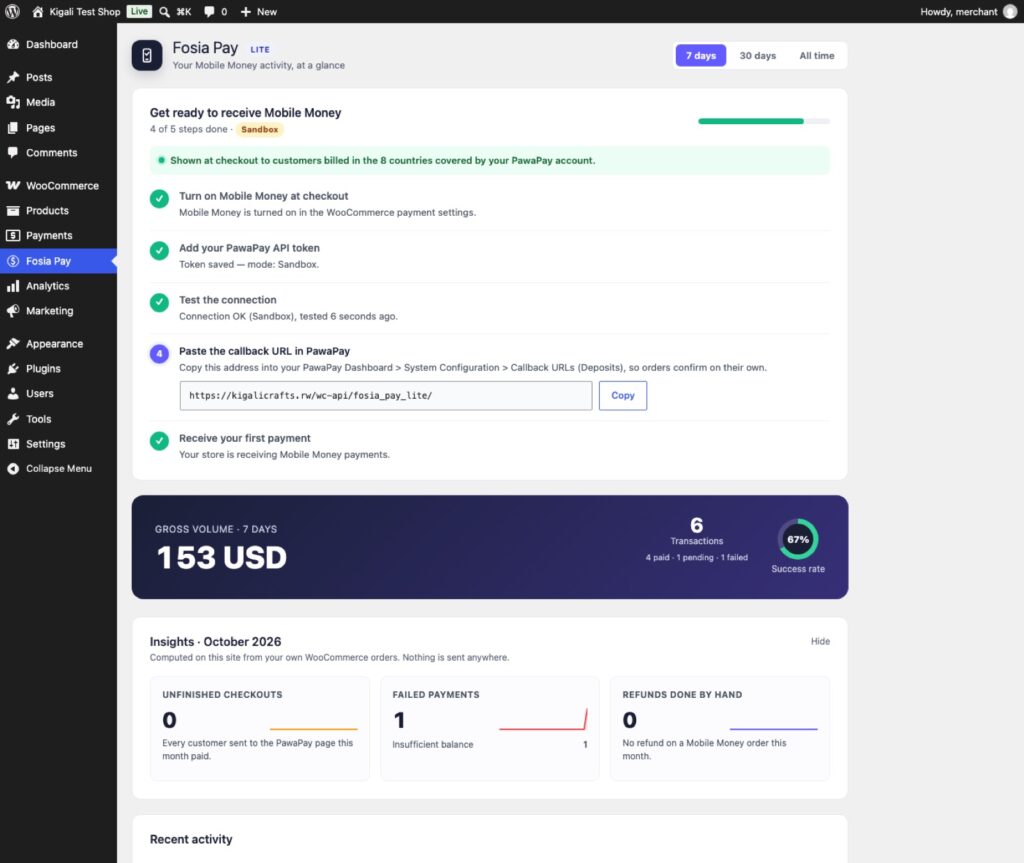
The catch: PawaPay’s callback settings take one URL per payment type, and the Fosia docs remind you that an account keeps one address per type. Put ten stores on one PawaPay account and only one of them can receive its confirmations there.
The Agency plan solves it with a central callback router: one URL in PawaPay for every store, and each site registers with the router automatically. Payments still settle in the PawaPay account; the Fosia Pay page is explicit that Fosia Ltd never holds, routes or touches your customers’ payments. And every store still checks each payment with PawaPay before an order is marked paid.
First decision: whose PawaPay account?
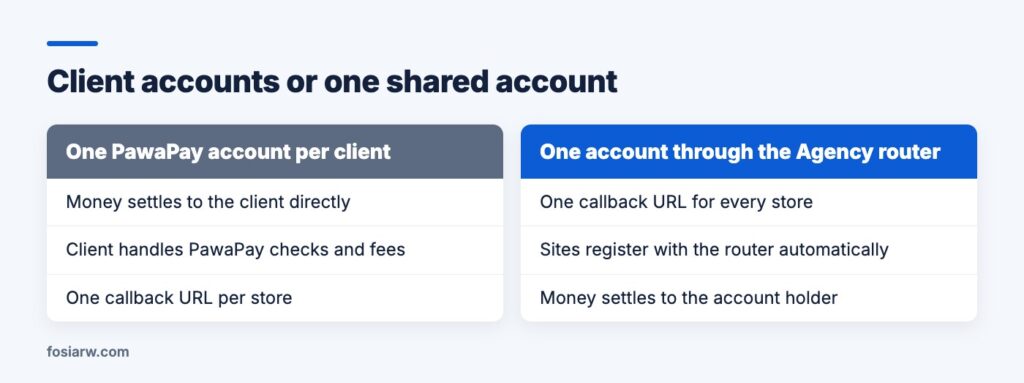
This is a business question before it is a technical one. Fosia Pay’s terms say the contract with PawaPay, its fees, its identity checks and its country coverage are between PawaPay and the account holder. So:
- Stores that belong to one business, such as a group with three brands, or one brand with a store per country, fit the shared account well: one owner, one PawaPay contract, one router.
- Stores that belong to different clients usually need each client’s own PawaPay account, so the money reaches the client and not your agency. If you plan to collect for clients on your own account, ask PawaPay first whether your contract allows it.
An Agency licence covers up to 25 client sites (domains), managed from your account on pay.fosiarw.com. If some clients keep their own PawaPay accounts, ask FOSIA during the setup call how to combine them with the router.
The numbers: single licences or Agency
Pro and Pro + AI keys are each valid for one site and locked to the first domain where they are activated. For 25 stores, at the regular prices on the pricing page:
| Setup for 25 stores | Per year | Once for life |
|---|---|---|
| 25 Pro licences | $499.75 | $1,475 |
| 25 Pro + AI licences | $999.75 | $2,975 |
| 1 Agency licence | $79.99 | $249 |
The break-even comes early. Five Pro licences cost $99.95 a year, more than one Agency licence, and three Pro + AI licences cost $119.97. Agency also includes the Pro + AI features on every site. Prices are in US dollars, paid by Mobile Money in your local currency, and yearly licences never renew automatically.
What each client store gets
Agency includes everything in Pro + AI, on each of the 25 sites:
- Checkout: the payment prompt reaches the customer’s phone without a redirect, the operator is read from the phone number, the number is checked as it is typed, and outages show before paying.
- After the sale: full or partial refunds from the WooCommerce order, payouts to one person or a CSV of up to 1,000 rows with a review step, payment links with QR posters and table stickers.
- Automation: recurring payments with monthly e-mail invoices, a REST API, the MCP server for AI agents (early access), and an AI assistant on the store’s own sales data with the client’s own Anthropic key.
- Design: the four Fosia Pay modules for Divi 5 (Pay Button, Payment Link Card, Pricing Table, Accepted Networks).
- Your brand: white label with your name and logo, and priority e-mail support with a reply within 1 business day.
Rolling it out, client by client
- Book the free setup call included with paid licences, and decide the account model for each client.
- Install the paid plugin from My account on each site, paste the PawaPay token and the licence key in WooCommerce, Settings, Payments.
- Test in sandbox with PawaPay’s test numbers for the client’s country: one paid order, one failed.
- Switch to the live token once PawaPay has enabled the client’s networks.
- Keep a register of each site, its domain and its account. If a client moves to a new domain, FOSIA releases the licence on request.
If a yearly Agency licence is not renewed, every store keeps taking payments in Lite mode on the hosted payment page, and the paid features pause until renewal. Nothing is deleted. Already on Pro? You can move up at any time, and FOSIA credits the unused part of your current licence.
Some clients will prefer to buy their own licence. You can recommend Fosia Pay through the Fosia Pay affiliate program: 35% of the price paid before tax on Pro, Pro + AI, Agency and Fosia Crowdfunding Pro, and renewals are commissioned too (see the programme terms). Our article on affiliate income for web designers shows how agencies combine both.
Frequently asked questions
Does the router touch my clients’ money?
No. The router passes payment notifications to the right store. Money settles in the PawaPay account, and Fosia Ltd never holds, routes or touches it.
Will my clients see the Fosia name?
The Agency plan includes white label with your name and logo.
What happens if I do not renew the Agency licence?
Every store keeps accepting payments in Lite mode on the hosted payment page; paid features pause until you renew, and nothing is deleted.
Is it safe to run payments for 25 stores?
Each store checks every payment with PawaPay before marking an order paid. Read how each Mobile Money payment is verified.
Which networks can the stores accept?
Those enabled on the PawaPay account behind each store, among 43 networks in 21 African countries.
Ready to equip your client stores? Compare plans on the pricing page, start each client with our PawaPay setup guide, see the Divi 5 modules guide (in French), or test Fosia Pay Lite for free on a staging site today.