

In short: a year-end giving campaign works best with a plan: prepare in the last week of November, launch on 1 December, post an update every week, bring Christmas services and events in with a QR code, make a last call before 31 December, and thank donors in January. For Mobile Money on your own website, use Fosia Collect for a simple Donate form, or Fosia Crowdfunding for a campaign page with a goal; both send the money straight to your own payment account.
December is when many families think about giving: the Christmas season, the end of the year, relatives coming home. For an NGO in Kampala, a parish in Yaoundé or a youth association in Kigali, it can also be the month when an appeal gets lost among a hundred others. A clear plan, a page people can pay from in a few seconds, and regular news make the difference between a message that is read and one that is scrolled past.
First choice: a form or a campaign page?
Both tools take Mobile Money and charge no commission. They answer different needs.
| Your appeal | Best tool | Why |
|---|---|---|
| Year-end gifts for running costs | Fosia Collect (free) | A Donate form on any page, no WooCommerce, totals per form |
| Christmas offering or thanksgiving | Fosia Collect (free) | One form per type of gift, e-mail receipts |
| A project with a target: meals, school kits, a roof | Fosia Crowdfunding Lite (free) | Goal, progress bar, end date, budget lines, updates |
| A project with a sponsor or cash collections | Fosia Crowdfunding Pro | Matching sponsor, offline gifts, proof of spending |
Fosia Collect works without a shop. Fosia Crowdfunding needs WooCommerce, because each donation is a WooCommerce order, and works with Fosia Pay for Mobile Money (Fosia Pay Lite is free). Crowdfunding Pro costs $29.99 a year or $89 once for a lifetime licence.
The plan, week by week
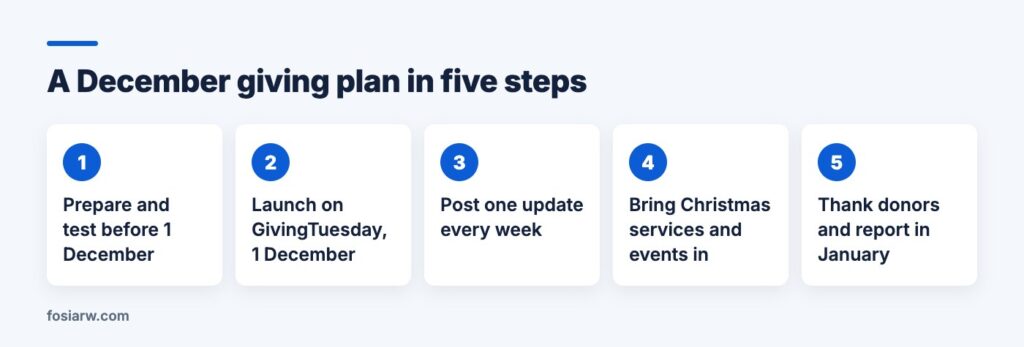
23 to 30 November: prepare
- Check that your PawaPay merchant account is in the organisation’s name and live. A sandbox account is free; the live account is opened after your documents are checked, so do not leave it to the last week.
- Install the plugin, test a payment with a PawaPay sandbox number, then switch to your live token.
- Write the story in five sentences: who you help, what changes, how much it costs, by when, and what one gift buys.
- Choose amounts that match local wallets, for example 2,000, 5,000 and 10,000 RWF, or 5,000, 10,000 and 20,000 UGX.
1 December: launch on GivingTuesday
According to its official website, GivingTuesday is a global generosity movement created in 2012, and this year it falls on 1 December 2026. You do not need to register anything to use the date: it simply gives your first message a reason. Send it to your WhatsApp groups, post it on your pages, and pin the link.
2 to 14 December: news every week
Post one short update each week: what the first gifts already paid for, a photo, the amount still needed. If a local business or an alumni group wants to help, offer them a match; our guide to matching sponsor campaigns explains how to agree it in writing.
15 to 25 December: services, concerts and family gatherings
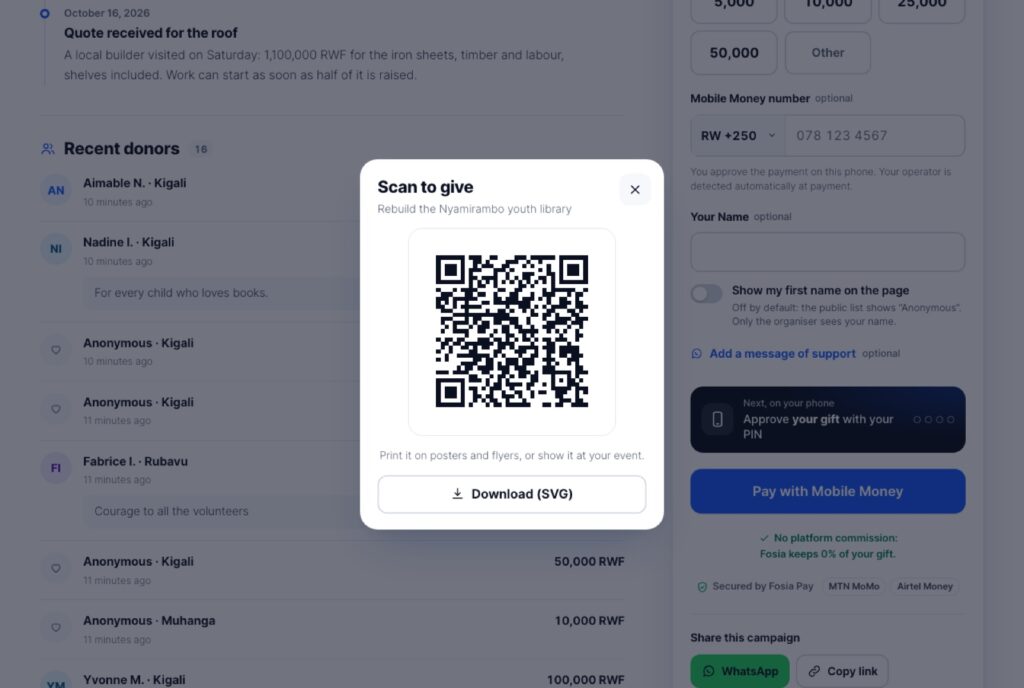
Many people give in person in this season. Put the campaign’s QR code on the notice board, on the programme of the carol service and on a screen at your event. People scan it and pay from their phone.
Cash still comes in at Christmas. Crowdfunding Pro records it as an offline gift with its source, shown apart from Mobile Money gifts. For church giving, read our guides on giving to places of worship and, in French, tithes and offerings by Mobile Money.
26 to 31 December: the last call
Send one clear reminder: “Our year closes on 31 December. 400,000 RWF to go for the school kits.” One message, not five. Our WhatsApp fundraising guide covers etiquette in groups.
January: thank and report
Thank donors with a final update: what was raised, what it bought, what comes next. With Crowdfunding Pro, add proof of spending with receipts, as described in our French guide on proof of spending. Then export the CSV for your annual accounts.
Keep the numbers clear for the treasurer
With Fosia Collect, create one form per appeal: “Year-end gift”, “Christmas offering”, “School kits”. The dashboard shows the total of each form, this month’s total and the total since the start.
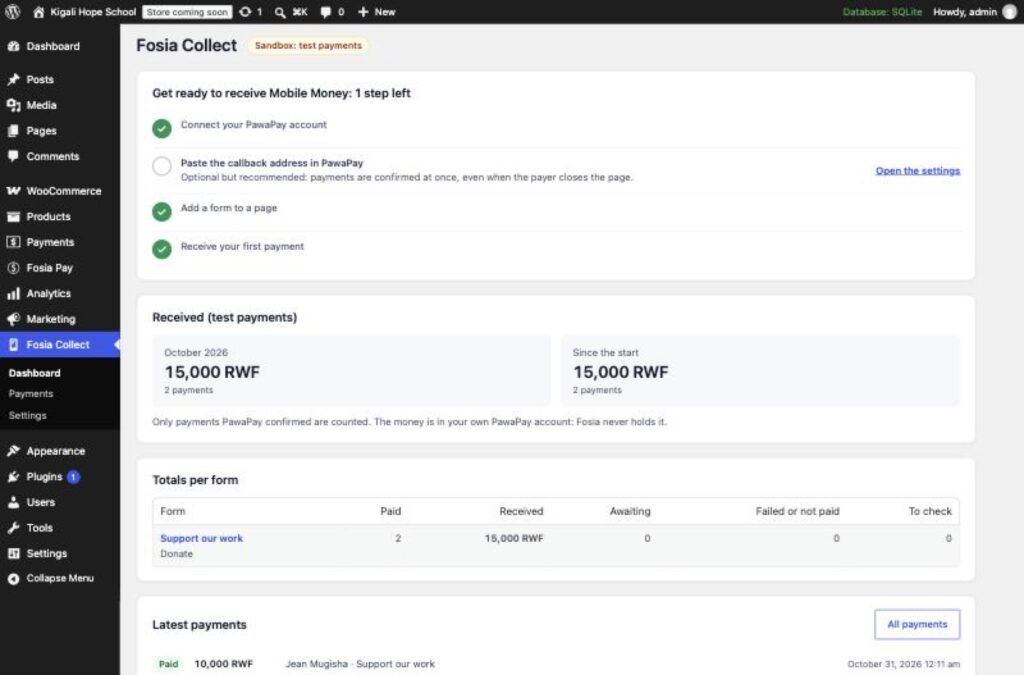
Every payment is checked with your own payment account before it shows as paid. Donors see the real status, and a failed payment shows the reason with “Try again”. With Collect, a receipt is e-mailed once the payment is confirmed if the donor gave an address; with Crowdfunding, each gift is a WooCommerce order, so receipts work as usual. FOSIA never holds the money.
Frequently asked questions
Can donors abroad give?
Yes, from a Mobile Money wallet in a country enabled on your payment account, among 21 African countries. A Fosia Collect form can also be in USD or EUR, with an estimate in the donor’s currency before paying.
Can we set up monthly giving for next year?
Not automatically. Mobile Money asks the payer to approve every payment on the phone, so there is no automatic debit. A monthly reminder with the link works instead.
Can we use Collect and Crowdfunding on the same site?
Yes. Fosia Collect keeps its payments in its own list and does not touch WooCommerce, so both can run side by side.
What if we do not reach the goal by 31 December?
Say so honestly in an update, explain what the money raised will cover, and decide whether to extend. In Crowdfunding, the end date can be changed, or left empty for no end date.
Who can see the donors’ names?
On a Crowdfunding page, the public list shows “Anonymous” unless the donor chooses to show their first name. With Collect, “Give anonymously” keeps the name out of your records.
December starts in a few days: download Fosia Collect free, start a Crowdfunding campaign, or book a free call and plan your year-end appeal with the FOSIA team.